11.2.1 Menu Settings
Settings are accessed via the (E) button on the home screen Figure 1 (this may vary slightly between machine models). Use the navigation buttons for area-specific settings. The green button shows the active selection.
To change the settings – press the relevant field on the screen.
Edit by selecting a value or inputting a value in the pop-up window.
Confirm your selection between each setting.
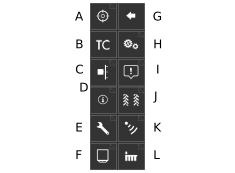
Figure 1.
Menu for selection of calibration type, 11.3 Calibration menu .
Activates Task Control and opens a settings submenu, 11.2.4 Task Control.
Lift and output verification, 11.3.1 Checking lift and output levels.
Information, 11.2.8 Information.
Machine settings, 11.2.3 Machine settings.
Device, 6.6 Unit
Back.
General settings. Lights up green to indicate the current selection; 11.2.2 General settings.
Alarm levels, 11.2.5 Alarm levels.
Tramlining, 11.2.6 Tramlining.
Calibrating the radar, 11.3.7 Calibrating the radar.
Setting row units; 11.2.7 Row unit settings.