11.3.1 Checking lift and output levels
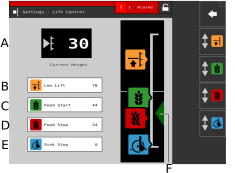
Figure 1.
Settings
Setting the level for the drilling position (TPF) and the LowLift position (TPF and TPL), as well as setting the levels for output start and output stop.
For TPT, TPV and TPR, the setting is only available if the tractor provides the height of the 3 point linkage via the ISO11786 connector or the ISO11783 connector. See Height Source in Chapter 11.2.3 Machine settings.
Lift height The machine’s momentary height.
LowLift Level The set value is a percentage of the level for a fully raised machine, which is 100. The maximum LowLift level for TPL is 20.
Level for output start The level at which the seed meter begins feeding out seed when the machine is lowered into the drilling position. The default values are the relative current values for the LowLift and drilling positions (for the machines where they are available). If the LowLift or drilling positions are changed, the output start level will also be adjusted.
Level for output stop The level at which the seed meter stops feeding out seed when the machine is raised to the LowLift position. The default values are the relative current values for the LowLift and drilling positions (for the machines where they are available). If the LowLift or drilling positions are changed, the output start level will also be adjusted.
Drilling position
Indicator arrows
The drilling position  should not be changed when feed start,
feed stop or LowLift are set! The setting is made during basic machine
setup.
should not be changed when feed start,
feed stop or LowLift are set! The setting is made during basic machine
setup.
(The drilling depth is set individually for each row unit.)
Adjustment
Press the button for the function to be set in the field with the height scale. You can also press the corresponding function button.
Raise or lower the drill unit to the desired position using the hydraulic lever. The indicator arrow (F) follows the drill unit’s movement along the height scale.
Confirm your value between each setting.
If you know in advance which value is to be set, this can be done by pressing the field which shows the value for the function you want to change. Enter the value in the pop-up window and confirm.
 and
and  can never be higher than
  or lower than .
can never be higher than .