6.6 Unit
When the page opens, a window is displayed warning that incorrect WorkStation settings may cause the machine to stop working. To access the page, you must accept by selecting Yes.
Row unit positioning does not normally need to be performed unless an existing WorkStation device is replaced. In that case, the new WorkStation device should be placed on its new row unit.
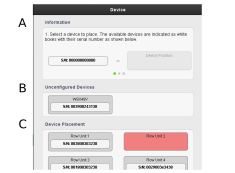
Figure 1.
All the machine’s WorkStation units are displayed here, along with information on which row they are connected to.
Information: explanation/guidelines on how to position available devices on the machine.
Unconfigured units.
Unit positioning: all row units should be connected to a WorkStation unit. To position the units for each row, follow the instructions at the top of the page.