11.2.7 Row unit settings
For TPL, an extra WS9 can be added. In which case, use an iPad to configure the row units.
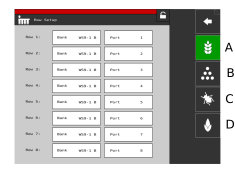
Figure 1.
A warning is shown before you enter the settings menu. Do not change any settings in this menu if you are unsure. An incorrect value could cause a row unit to stop working.
Every motor on the seed unit, micro-granulate unit and fertiliser unit must be programmed to the correct motor output on WS9. All machines are programmed to the correct machine type at the factory, but new programming may be required in conjunction with software updates or WS9 replacement.
Adjustment
Select which unit is to be set using the function buttons (the symbol goes green). Change the value by pressing the field to be set and enter a new value in the pop-up window. Settings must be made in accordance with 16 Motor outputs.
Seed motors
Fertiliser motors
Micro-granulate motors
BioDrill motors