11.4.1 Setting SeedEye:
It is important to ensure the SeedEye box is correctly connected to the machine.
Select which SeedEye box is to be connected to the machine’s left and right distributor heads by actively selecting the serial number for the SeedEye box in each field (A and B).
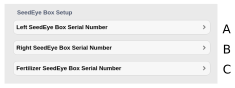
Figure 1.
The serial numbers are selected from submenus for seed in fields A and B and for fertiliser in field C. The current serial numbers can be found on the box label.
Press Re-register (E) to initiate the system.
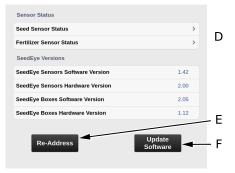
Figure 2.
Ensure that alarms 530, 540 and 620 do not exist. See 12.2 Alarm list
If the Addressing Error box appears on the screen: Check that all detectors are properly in contact with each other and that all diodes are lit correctly.
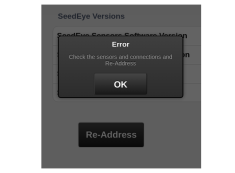
Figure 3.
Ensure that alarms 530, 540 and 620 do not exist.
Update the boxes and detectors with new software by pressing the Update Software button (F), Figure 1.
NoteThe software only needs to be updated if the corresponding alarm is active or if the software between the sensors and the respective boxes is different.
If the update is unsuccessful, repeat the software update by pressing the Update Software button (F) again.
Detector Status (D) Figure 2; see 11.6.1 Adjusting the sensors.