8 Configuration
The seed drill always has basic factory configuration settings with the correct machine type, size, etc. When the Gateway device that contains the machine’s memory is replaced, a new basic configuration must be made. In the following screen, certain settings are made, such as the equipment mounted on the machine.
Changes in this menu should normally not be needed unless the machine is modified.
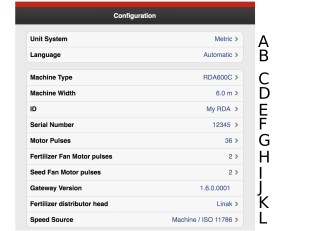
Figure 1.
Unit of measurement, select metric or imperial
Language setting. Language settings are normally changed in the menu for the control device1. If the desired language for the control unit is not available, the language can be selected in this menu2.
Specify machine type (see name plate).
Specify machine width (see name plate).
It is possible to enter user-specific information, e.g. your name.
Record the machine’s serial number here.
Motor pulses: Specify how many pulses occur per revolution of the motor (motor/motors in the seed feed). Depending on the type of motor the machine has, this will be either 30, 36 or 360. This is a factory setting and is not to be adjusted.
Motor pulses for the fertiliser fan (RDAC only). Specifies the number of pulses per revolution for the fertiliser fan motor. Depending on the type of motor the machine has, this will be either 2 or 9. This is a factory setting and should not be adjusted, except possibly if the fan motor is replaced.
Motor pulses for the seed fan. Specifies the number of pulses per revolution for the seed fan motor. Depending on the type of motor the machine has, this will be either 2 or 9. This is a factory setting and should not be adjusted, except possibly if the fan motor is replaced.
Gateway software version.
Specify which fertiliser distributor head the machine has. This is a factory setting and is not to be adjusted.
Speed source.
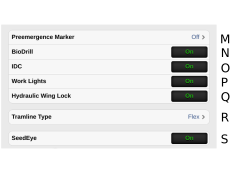
Figure 2.
Pre-emergence bout marker.
OFF
Pre-emergence bout marker (option)
Side bout markerWhen selected, the side bout marker will make a track in the centre of the previous bout when tramlining is performed for this bout
BioDrill (option).
ON means that the machine has BioDrill.
OFF means that the machine does not have BioDrill.
If you do not want to use BioDrill, enter 0 in sown amount in the calibration menu or press I in Figure 1.
IDC (option) ON means that the sowing depth has been set using IDC. OFF means that the sowing depth has been set using the Low-Lift switch.
Work lights
ON = Work lights fitted.
OFF = Work lights not fitted
When work lights are fit, activation/deactivation is from the home screen
Hydraulic wing lock ON indicates that the hydraulic wing lock has been mounted.
Select type of tramlining:
RDA 400S/800S
OFF tramlining OFF.
Fenix means that the tramlining menu is activated with “Fenix” tramlining hatches.
FLEX indicates that the menu for tramlining is activated with “Flex” tramlining hatches.
RDA 600S
OFF tramlining OFF.
Fenix means that the tramlining menu is activated with “Fenix” tramlining hatches.
FLEX indicates that the menu for tramlining is activated with “Flex” tramlining hatches.
RDA 600C/J
OFF tramlining OFF.
Linak indicates that the menu for tramlining is activated with “Linak” tramlining hatches
FLEX indicates that the menu for tramlining is activated with “Flex” tramlining hatches.
RDA 800C/J
OFF tramlining OFF.
Accord indicates that the menu for tramlining is activated with “Accord” tramlining hatches.
FLEX indicates that the menu for tramlining is activated with “Flex” tramlining hatches.
In the basic settings menu, the navigation button
 and settings for tramlining are lit up
when tramlining is on.
and settings for tramlining are lit up
when tramlining is on.On the home screen, the
 symbol will light up.
SeedEye (option)
ON – the machine is equipped with SeedEye
OFF – the machine does not have SeedEye
If SeedEye is to be deactivated, set the SeedEye settings to OFF for 11.3 SeedEye activation.
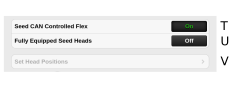
Figure 3.
Seed CAN controlled Flex ON/OFF
Fully equipped seed distributor heads ON/OFF
Set position of seed distributor head. The button is only displayed when CAN controlled Flex for seed or fertiliser is selected (ON). The button is displayed but is disabled if the CAN heads are not connected or have not been started up. The menu is used to set the correct position for each CANBus Flexhead.