8.1 Setting the seed distributor head
Press A to set the seed distributor head(s).
The picture shows that none of the seed distributor heads are mapped (red cross over the seed distributor heads). This shows a machine with two CAN Flexheads. If there is only one seed distributor head, only one will be displayed.
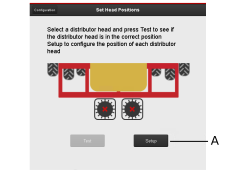
Figure 1.
Press Identify (B).
When the user presses Identify CAN Flex head on the machine, all motors/hatches will move up and down.
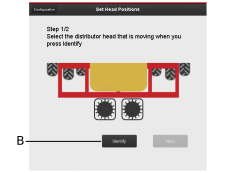
Figure 2. Only displayed for machines with two seed distributor heads
Choose the seed distributor head with moving motors. It is recommended that you do this while standing in a position from where you can see the motors/? moving.
Remove the cover from the seed distributor head.
Press Next (C) to continue to the next step.
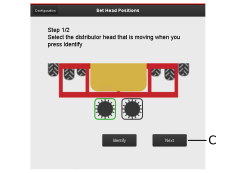
Figure 3. Only displayed for machines with two seed distributor heads
The last head is automatically mapped to the free position. The two green ticks indicate that the heads have been mapped correctly. If the machine has one head, the head will be mapped automatically and this page will be the next page to be displayed after the user presses Setup. (Only one head will be displayed.)
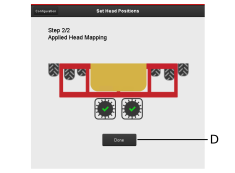
Figure 4.
Press Done (D).
Back to first page. Here you can see that both heads are mapped.
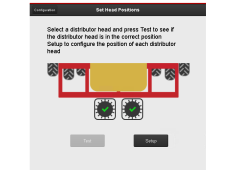
Figure 5.
If a mapped CAN Flexhead is marked, the Test button (E) will be visible.
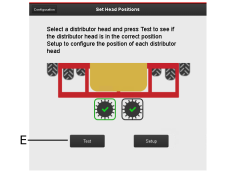
Figure 6.
Press Test (E) and the selected head will move all motors/hatches up and down.