5.1 Display for control and monitoring
Field A on the home screen. See figure Figure 1.
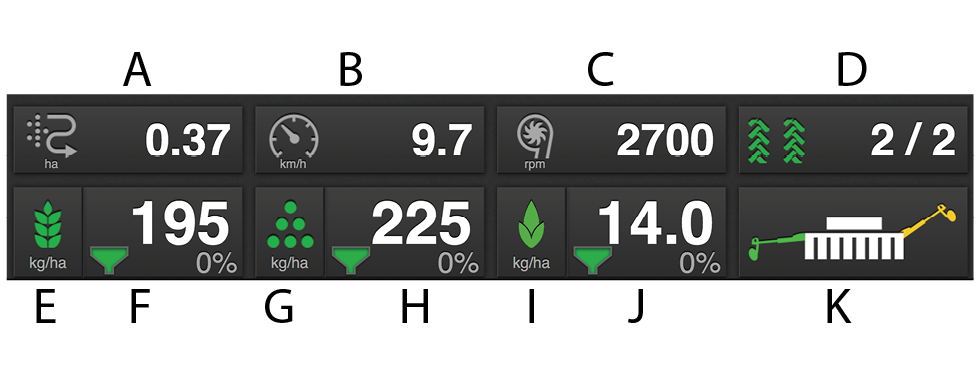
Figure 1. Work display
Area meter/Area sown per hour
Tap the field to choose one of the following functions:
 shows the area sown since the latest
reset.
shows the area sown since the latest
reset. shows the sown area per hour at the current
speed.
shows the sown area per hour at the current
speed.
Driving speed/Sowing depth value
Tap the field to choose one of the following functions:
 shows the driving speed.
 shows the seed depth value (only if the machine has IDC)
Seed fan speed/Fertiliser fan speed
 shows the seed fan speed.
 shows the fertiliser fan speed (only RDAC)
 shows the tramline.
The first number shows which phase of the tramlining cycle you are in.
The second digit displays the number of tramlining cycles selected in the tramlining menu, see 6.5 Tramlining.
On/off seed output. Green indicates that it is On.
Seed application rate shows the amount of seed fed out per hectare. Press the field for the seed application rate to open a pop-up window for variable sown amount. When SeedEye is activated with seed counting, sown amount is displayed in number of seeds/m2 instead.
See Figure 1.
On/off fertiliser feed output. Green indicates that it is On (only RDAC)
Fertiliser application rate shows the amount of fertiliser fed out per hectare. Press on the field for the fertiliser application rate to open a pop-up window for variable sown amount (only RDCA)
See Figure 1.
On/off BioDrill feed. Green indicates that it is On.
The BioDrill application rate shows the amount of output per hectare. Pressing the BioDrill application rate field brings up a pop-up window for the variable rate.
See Figure 1.
Bout marker switching
Shows the current position of the bout marker arms. Press the field to switch bout marker.
Switches manually or automatically depending on selection with the function button
 .
.