5 The home screen
The terminal will determine the appearance and function of sub-menus in the form of keyboards and scroll menus. Please read the terminal’s user guide for information as to how to operate it.
The application is installed on the terminal supplied with the machine at the factory.
The home screen is the view shown whilst operating All the information that it is important to monitor is shown here, and all necessary settings can be made here too.
Open the Väderstad application using
the icon for “E-Control”  . The terminal imports the software from
the machine’s Gateway and all important data related to machine functions,
alarms, etc. are presented in a clear and easy-to-read way on the
screen.
. The terminal imports the software from
the machine’s Gateway and all important data related to machine functions,
alarms, etc. are presented in a clear and easy-to-read way on the
screen.
Press the navigation button for the home
screen 
In the submenus, click on the name of the previous menu (at the top left) to return to that menu.
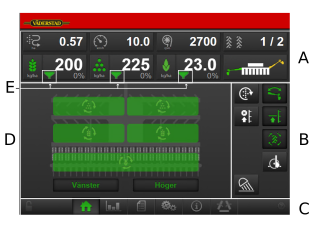
Figure 1. Home screen (displays RDAC with BioDrill)
Fields on the screen:
Display for control and monitoring
See section 5.1 Display for control and monitoring.
Function buttons
See section 5.2 Function buttons.
Navigation buttons that open submenus for basic settings and alarms
See section 5.3 Navigation buttons.
Machine symbol (centre of the screen)
See section 5.4 Machine symbol.
The tank level icon that is displayed in two different versions
See section 5.5 Tank level.