15 Task Control
Task Control is a GPS-based help function to use in the field. A GPS terminal supporting this function is required for Task Control to work correctly. Contact your local GPS supplier to ensure that you have the correct functionality
To access this menu, select Settings/Settings/Task Control.
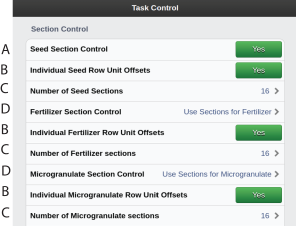
Figure 1. Task control
Functions
Shut-off by row, seed
Use individual offset for the rear row units for seed/ fertiliser/ microgranulate/ BioDrill/ Liquid fertiliser YES/NO (Only for PCV, TPK)
Number of sections, seed/ fertiliser/ microgranulate/ BioDrill/ Liquid fertiiliser= Max number of units that the monitor sends to the Task Controller screen. If this is exceeded, then several row units will share one section.
Example: a 32-row machine with a maximum number of 16 sections installed, results in only 16 sections being reported on the screen
Shut-off by row fertiliser/ microgranulate/ BioDrill/ Liquid fertiiliser
Three options are possible:
Same as shut-off by row for seeding (A)
Specific shut-off by row for fertiliser/ microgranulate/ BioDrill/ Liquid fertiiliser
No shut-off by row
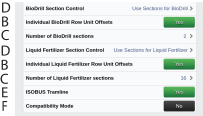
Figure 2.
ISOBUS Tramline YES/ NO
Compability mode YES//NO. Can be used with ISOBUS terminals that have compatibility issues. The setting should by default be set to OFF, but can be set to YES if experiences problems with the following issues:
Functions without section control or sectional rate control not drawing coverage. Adds a single section to each of these functions.
Downforce logging not being able to draw the actual downforce. Adds setpoint values that are not used.
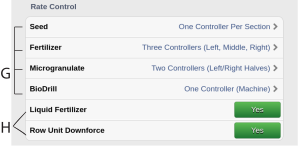
Figure 3. Rate Control
Variable application rate according to control file. Available options:
The product use one rate controller for the whole machine.
The product use two rate controllers for the left/right side of the machine.
The product use three rate controllers for the left/middle/right zones of the machine.
The product use one rate controller for every section.1
Variable application rate for liquid fertiliser/ row unit downforce according to control file. The product use one rate controller for the whole machine.
Using many rate controllers might slow down the ISOBUS terminal. If experiencing performance issues, try reducing the use of rate controllers.
Each product that uses rate control with a control file counts as one TC control channel, as seen in Figure 15 and can have multiple rate controllers.
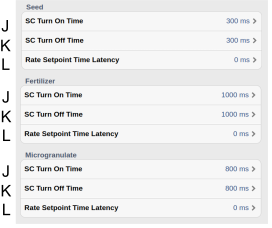
Figure 4. Rate control seed, fertiliser, microgranulate
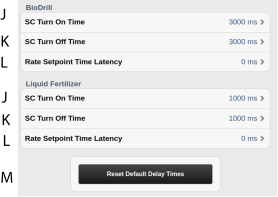
Figure 5. Rate control BioDrill, liquid fertiliser
SC Turn On Time = Time compensation for seed/ fertiliser/ microgranulate/ BioDrill/ Liquid fertiliser transportation (switch on)
Example: if it takes 0.3 seconds (300 ms) for seeds to reach the seed coulter after the motor has begun rotating, then the setting in this field should be 0.3 seconds (300 ms). This means that the motor begins rotating 0.3 seconds (300 ms) before the expected switch on. Units in this field should be entered in ms.
NoteUnits in this field should be entered in ms.
SC Turn Off Time = Time compensation for seed/ fertiliser/ microgranulate/ BioDrill/ Liquid fertiliser transportation (switch off)
Example: if it takes 0.3 seconds (300 ms) for seeds to reach the seed coulter after the motor has stopped rotating, then the setting in this field should be 0.3 seconds (300 ms). This means that the motor stops rotating 0.3 seconds (300 ms) before the expected shut off
NoteUnits in this field should be entered in ms.
Rate Setpoint Time Latency = Time compensation when changing the variable rate.
Example: If it takes 1.0 s (1000 ms) for the system to adjust the new rate, the setting will be 1000 ms.
Button, Reset Default Delay Times
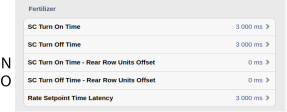
Figure 6. Rate control fertiliser, with section control
SC Turn On Time = Time compensation for fertiliser transportation to rear row units compared to front row units (switch on). (Only for PCV)
SC Turn Off Time = Time compensation for fertiliser transportation to rear row units compared to front row units (switch off). (Only for PCV)
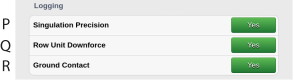
Figure 7.
Singulation precision: YES/NO. Logs the actual skip/double values of every section. Uses DDI:s 417/419. Requires number of seed sections to be set to the number of rows of the machine.
Row unit downforce: YES/NO. Logs the actual row unit downforce of every section. Available for individual controlled row unit downforce.
Ground contact: YES/NO. Logs the actual and average ground contact of every section. Available when Row unit downforce logging is set to YES. Uses proprietary DDI:s 61440/61441.

Figure 8.
Type of DDI used for row unit downforce logging and rate control. Available options:
Use official Downforce As Force values.2
Use row unit downforce as Mass Per Area DDI values. Alternative if the official DDI values are not supported. This uses control files where 1 kg of downforce is represented as 1 kg/ha.