3.5 Connecting to ISOBUS
Connect the cable from Gateway to the tractor’s ISOBUS connector. Take care when making the connection
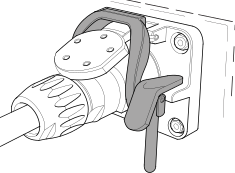
Figure 1.
Make sure that the pins of both connectors are aligned.
Attach the connector using the latch clamp. (May look different for different tractors.) The terminal detects that a Gateway is connected and automatically imports the software.
The cable is hung in the hose holder together with the hydraulic hoses.