6.5.1 Tramlining ports SeedEye
When SeedEye or CANBus Flexhead is installed, the user must specify tramlining ports (not displayed when using “Dynamic” tramlining).
For machines with only SeedEye installed, see Figure 2.
For machines with CANBus Flexhead with or without SeedEye, see Figure 3.
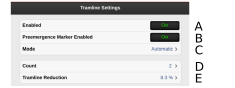
Figure 1.
When both tramlining and SeedEye are activated, the fields for left and right tramlining (F/H) and (G/I) are displayed in addition to fields (A) – (E), depending on the configuration.
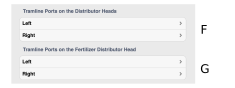
Figure 2.
These fields (F) and (G) show which ports on the seed head are blocked during tramlining on the right and left side. The numbers of the ports are separated by a comma.
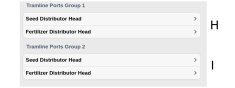
Figure 3.
These fields (H) and (I) show which ports on the seed head are blocked during tramlining on the right and left side. The numbers of the ports are separated by a comma.