5 The home screen
The home screen is the view shown whilst operating All the information that it is important to monitor is shown here, and all necessary settings can be made here too.
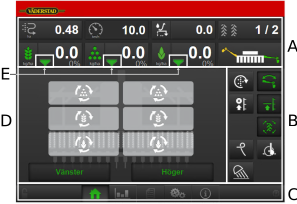
Figure 1.
Fields on the screen:
Display for control and monitoring.
See chapter5.1 Display for control and monitoring.
Function buttons
See chapter5.2 Function buttons.
Navigation buttons that open submenus for general settings and alarms.
See chapter5.3 Navigation buttons.
Machine symbol (centre of the screen)
See chapter 5.4 Machine symbol.
The seed icon that is displayed in two different versions
See chapter 5.5 Tank level.