6.7.4 Basic system settings
To achieve optimum operation, the system should be adjusted to suit the conditions in which the machine is to be used.
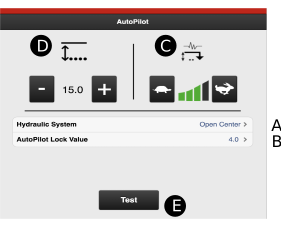
Figure 1.
Setting the hydraulic system
First, select the hydraulic system type used by the tractor.
If a tractor uses a constant oil flow system, which means that the tractor’s hydraulic pump has a fixed displacement, the AutoPilot hydraulic block must have an Open Centre valve activated. This valve allows oil to pass at low pressure through the valve block even when no adjustment is made. The valve can be opened by selecting Open Centre.
Setting for older tractors that lift slowly. If your tractor uses a constant pressure system, in which the hydraulic system uses constant work pressure regardless of the amount of oil consumed, the Closed Centre option should be selected instead.
If your tractor has a load-sensing hydraulic system, it is possible to select the option which is best for the tractor: Open or Closed Centre. If Open Centre is selected, the flow from the tractor should be adjusted according to the “Setting the oil flow rate” chapter in the machine’s instruction manual.
If you are not sure which option to choose, please contact your tractor supplier.
Setting the AutoPilot lock value
Setting the value for the AutoPilot lock. This function prevents the AutoPilot system from lowering the machine when it is raised from the furrow. The AutoPilot lock locks the system for 4 seconds when the Actual value deviates from the Set value by the number selected here. The standard value is 4. Normally, this does not need to be changed. However, if the machine has a tendency to lower once it is raised, a lesser value should be selected.
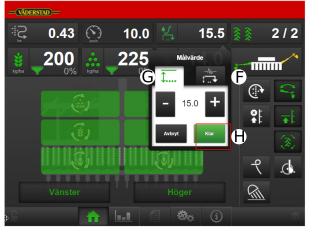
Figure 2.
Selecting adjustment sensitivity
 (F) in the AutoPilot system menu on the home screen (

Press H (Figure 2) to return to Drive mode
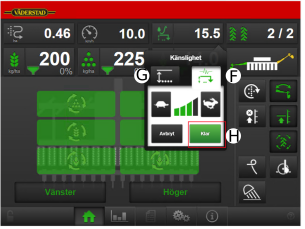
Figure 3.
Setting the drilling depth
Adjust as follows:
Set the drilling depth as usual using the Control system.
Get down from the tractor and visually check the drilling depth to make sure it is correct.
Drive the machine at normal speed and lowered to the drilling position. The oil supply to the AutoPilot system must not have been switched on.
Activate AutoPilot by pressing the
 button on the home screen. The symbol changes to
  and turns green to indicate that the system is active (the symbol
turns green when the machine is travelling forwards and white when
the machine is stationary).
and turns green to indicate that the system is active (the symbol
turns green when the machine is travelling forwards and white when
the machine is stationary).Press the button that displays the actual drilling depth. The drilling depth setting menu will be displayed.
Use the plus and minus buttons to select the desired value next to
 . If the drilling depth is correct following visual checking, the
value beside (G, Figure 3) becomes the same as the
value shown beside I, Figure 3. This is
the value that the system is working towards.
. If the drilling depth is correct following visual checking, the
value beside (G, Figure 3) becomes the same as the
value shown beside I, Figure 3. This is
the value that the system is working towards.Return to Drive mode by pressing H, see Figure 3.
Activate the oil supply to the AutoPilot system from the tractor. The system has now been calibrated and is ready for use. AutoPilot now works with the machine lowered to the drilling position when the drilling speed exceeds 2 km/h.