3.2 Connecting with ethernet cable (option)
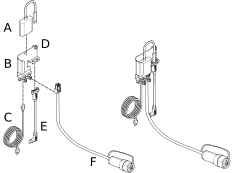
Figure 1.

  1. Adapter

  2. Bracket

  3. USB-C cable

  4. Screw/washer

  5. Cable (connecting to iPad)

  6. CAN cable (connecting to the machine)

Cable (C), cable (E) and cable (F) should be connected to the adapter (A).
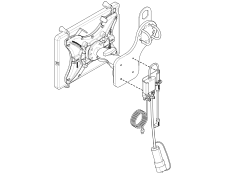
  1. The ethernet cable can be connected to the iPad holder in two different ways. See Figure 2 and Figure 3.

  2. Assemble the bracket (B) with the screws/washers (D), Figure 1, to the magnet bracket (K) for the iPad holder (Figure 1).

    Figure 2. Magnetic bracket alternative

  3. Connect the cable (E, Figure 1) to the iPad’s charging port.

  4. Connect the USB-C cable (C, Figure 1) to the power connector (I, Figure 1.

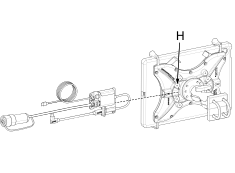
  5. Assemble the bracket (B) with the screws/washers (D), Figure 1, to the holes (H, Figure 3) on the iPad holder (C,Figure 1).

    Figure 3. Fixed bracket alternative

  6. Connect the cable (E, Figure 1) to the iPad’s charging port.

  7. Connect the USB-C cable (C, Figure 1) to the power connector (I, Figure 1.