5.4.1 Tramline
For successful tramlining, it is very important to carefully consider furrow plans before starting the work.
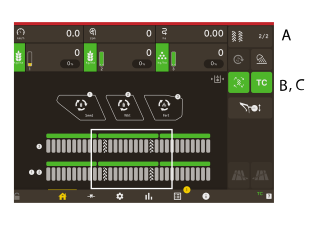
Figure 1.
In the tramline menu in, choose whether tramlining should be activated and set the bout in which you want to place drive tracks. Also see 7.2.3 Tramline settings.
Tramlining cycle, The first number displays the current phase that is active. The second number displays the number of training cycles selected in the tramlining program. It is also possible to design a tramlining program in which every bout that is included in the tramlining cycle can be individually programmed.
Displays that the tramlining automatic function (B), is active.
Displays Task Control Overide (C) is active.
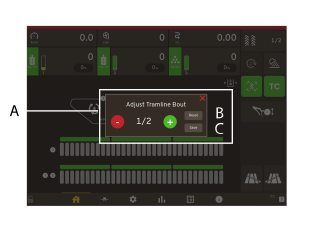
Figure 2.
To adjust tramline bout, press B,Figure 1
Pop up window, to adjust tramline bout.
Restarts the tramlining program on 1.
Confirms any change in the sequence
- (minus), steps back in the tramlining program.
+ (plus), steps forward in the tramlining program.