5.2 The hoppers
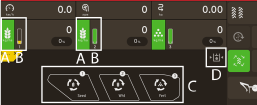
Figure 1.
Product
 /
/ 
Hopper, the product is used in
Visualisation of the products in the hopper
Safe state. Displays the safety status of the machine.
-

-
Machine is secure and cannot move.
-

-
Machine is not secure and can move
-

-
Machine is not secure and can move, but the safety valve is closed and pressure is falling rapidly
-
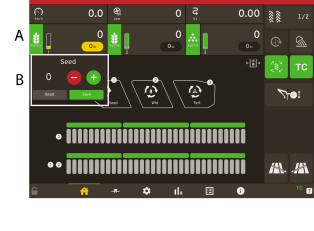
Figure 2.
Press somewhere in the area A, to change the value (%) for the products output.
A pop up window (B) will appear on the screen.
Press + or –, to add the new value. To change settings
Press Save.
To exit the menu without changes, press X.