12.2.1 Menu settings
Settings are accessed via the (C) button on the home screen Figure 1 (this may vary slightly between machine models). Use the navigation buttons for area-specific settings. The green button shows the active selection.
To change the settings – press the relevant field on the screen.
Edit by selecting a value or inputting a value in the pop-up window.
Confirm your selection between each setting.
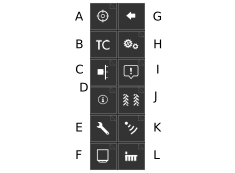
Figure 1.
Menu for selection of calibration type,12.3 Calibration menu .
Activates Task Control and opens a settings submenu, 12.2.4 Task Control.
Lift and output verification, 12.3.7 Checking lift and output levels.
Information,12.2.8 Information .
Machine settings, 12.2.3 Machine settings.
Device, 12.5 Device Setup.
Back.
General settings. Lights up green to indicate the current selection; 12.2.2 General settings.
Alarm levels, 12.2.5 Alarm levels.
Tramlining, 12.2.6 Tramlining.
Calibrating the radar, 12.3.6 Calibrate the radar.
Row setup, 12.2.7 Row setup.