12.2.7 Row setup
CAUTION
A warning will be shown before you enter the settings menu: Do not change any settings in this menu if you are unsure. An incorrect value could cause a row unit to stop working.
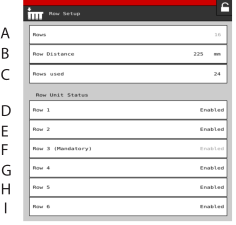
Figure 1.
Preset (factory settings). Open row unit settings, save row unit settings
Row spacing
Number of activated rows
Row 1 (mandatory)
Row 2*
Row 3 (mandatory). *
Row 4 *
Row 5*
Row 6*
1 Enabled/Disabled/Disconnected