12.2.2 General settings
The precision seed drill always has basic factory settings with the correct machine type, size, et
Replacing the Gateway device that contains the machine’s memory requires resetting the machine’s basic settings
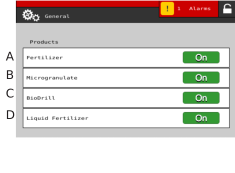
Figure 1. General settings products
The settings page can only be accessed when the machine is stationary. If a page in the menu is open, contact with the page will automatically be lost if the tractor is accelerated. An exception applies to the radar, since calibration takes place while the tractor is running.
For daily use no settings need to be entered in this menu.
Fertiliser output Off/ Normal/ FH (front hopper)
Microgranulate ON/OFF
BioDrill ON/OFF. 1
Liquid fertiliser ON/OFF
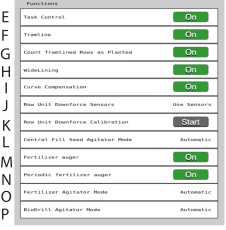
Figure 2. General settings functions
Task Control ON/OFF. While Task Control is enabled/disabled, a countdown will be displayed in place of ON/OFF.
Tramline ON/ OFF.
Count tramlined rows as planted. If selected, the section with active tramlining counts as seeded and shows as coverage on the task controller map.
If the machine is equipped with WideLining ON/OFF, this has to be marked. The output will then not be switched off for the row units that indicate tramlines and the row units will move laterally instead.
Curve compensation ON/OFF. Maintains same seed spacing on all rows at curves.
Row unit downforce sensors
Row unit downforce calibration
Central Fill Seed Agitator mode
Fertiliser auger ON/OFF
Periodic fertiliser auger ON/OFF
Fertiliser agitator mode
ON: Electric motor/ hydraulic valve is always running/open
OFF: Electric motor/ hydraulic valve is never running/open
AUTOMATIC: Electric motor/hydraulic valve running/open when any of the fertiliser motors are running.
Biodrill agitator mode
ON: Electric motor/ hydraulic valve is always running/open
OFF: Electric motor/ hydraulic valve is never running/open
AUTOMATIC: Electric motor/hydraulic valve running/open when any of the BioDrill motors are running.
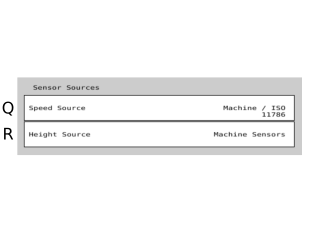
Figure 3. General settings sensors
Speed source
Height source, machine sensors
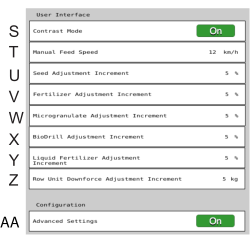
Figure 4. User interface
Contrast mode.
Manual feed speed. Speed to be used when using manual feed
Seed output percentage is adjusted by pressing the +/- buttons
Fertiliser output percentage is adjusted by pressing the +/- buttons
Microgranulate output percentage is adjusted by pressing the +/- buttons
BioDrill percentage is adjusted by pressing the +/- buttons
Liquid fertiliser output percentage is adjusted by pressing the +/- buttons
Row unit pressure in kilos is adjusted by pressing the +/- buttons
Advanced settings. Toggles accessibility to advanced settings ON/OFF