5.2 Display for control and monitoring
If the front tank is used, verify that the correct fan is used (see 6.4 Machine settings) to ensure a correct value in Figure 1, fan rpm fertiliser.
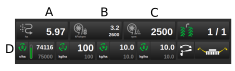
Figure 1.
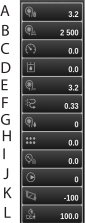
Figure 2.
Press A, B or C to access the menu, see Figure 1.
Information is displayed in the dropdown menu:
Fan rotation speed and air pressure, seed
Fan rotation speed, fertiliser
Operation speed
System pressure. Only selectable for TPL and TPK machines with system pressure sensor
Fan rotation speed and air pressure, Central Fill
Area sowed. Shows area sowed since last reset on statistic page daily
Fan rotation speed, BioDrill
Mean seed quality. Only selectable for TPK machines
Air pressure, liquid fertiliser
Pump rotation speed, liquid fertiliser
Average angle. Shows the mean value between the four parallel linkage sensors. Only selectable for PCV machines.
Mean ground contact. Shows average ground contact on all rows since the last reset on statistic page daily. Only selectable for machines with individual hydraulic row unit downforce.
Check at regular intervals, during operation, that the air pressure in the seed feed housing is maintained at 3.5 kPa
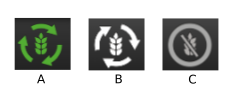
Figure 3.
Tap on any of the icons on row D; see Figure 1 to switch each individual product on and off (seed, fertiliser, Microgranulate, BioDrill)
Product (Seed) active, green icon
Product (Seed) inactive, white icon
Product (Seed) switched off, grey, icon
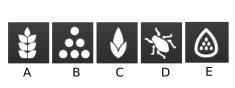
Figure 4.
Seed
Fertiliser
BioDrill
Microgranulate
Liquid fertiliser
If you press on the value next to any of the icons on row D, this opens a menu to reset the sown amount for each respective product.

Figure 5.