7.6 Calibration of machine and radar
To access the calibration menu select Settings/Calibration/Machine.
This menu shows calibration of different machine functions and motors, as well as the calibration of radar.
Press “Calibrate” or “Start” to start calibration of selected machine function.
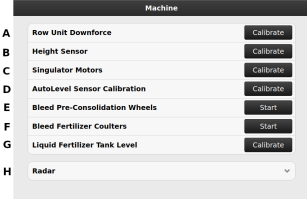
Figure 1. Machine calibration
Bleed Fertilizer Coulters
Available on Proceed V. Bleeding of the fertilizer coulters can be done to ensure proper function of the hydraulics, or if a component has been replaced.
When “Start” is pressed on (F) in Figure 1, the view used for bleeding fertilizer coulters appears. See Figure 2.
The Lift and Lower commands are used to set the cylinders in their end positions and when Finish is pressed, the function returns to automatic mode.
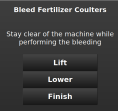
Figure 2.
Bleed pre-consolidation wheels
Bleeding is not possible to perform in low power mode.
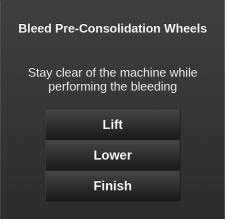
Figure 3.
Calibration of radar
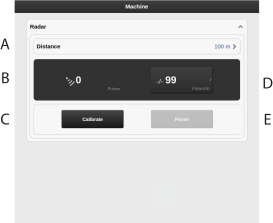
Figure 4. Calibration of radar
Field to enter the distance driven when calibrating.
Displays the total number of radar pulses whilst operating
Resets the number of radar pulses.
Displays the calibration result as the number of radar pulses/m.
Records the end of the calibration distance.
Calibration
Measure a specific distance (at least 100 m).
Press (C) at the starting point to reset the pulse counter. It is possible to reset several times, if necessary.
Drive the selected distance with the machine lowered to the drilling position and press (E) at the stop point.
Press the field (A) and enter the distance driven in metres.
The number of pulses per metre driven is calculated and automatically updated in field (D).