7.5 Calibration of BioDrill
To access the calibration menu select Settings/Calibration/BioDrill.
Values are displayed either in metric or imperial units, depending on which one has been selected in the general settings menu.
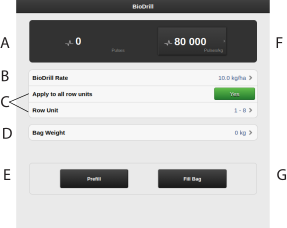
Figure 1. Calibration menu BioDrill
Calculates the number of pulses.
Enter the preferred sown amount for BioDrill.
Select which of the feed units is to be calibrated (i.e. a row with a calibration bag).
The position of the feed units is the same as that of the row unit.
If the calibration is to cover all output units, select YES (basic setting). If calibration is to be carried out individually for only one row unit, select NO.
Enter the weight of the calibration bag contents. Note that the weight can only be indicated when the reported number of pulses is greater than zero.
Fill the output system
Calculates pulses/kg. (You can also enter pulses/kg manually by pressing the field and entering the value in the pop-up window.)
Calibrate