7.4 Calibration of microgranulate
To access the calibration menu select Settings/Calibration/Microgranulate.
Values are displayed either in metric or imperial units, depending on which one has been selected in the general settings menu.
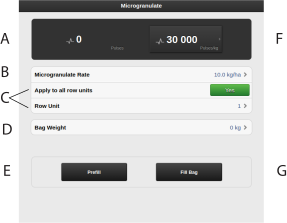
Figure 1. Calibration menu microgranulate
Calculates the number of pulses.
Enter the required microgranulate application rate.
Select which of the feed units is to be calibrated (i.e. a row with a calibration bag).
The position of the feed units is the same as that of the row unit.
If the calibration is to cover all output units, select YES (basic setting). If calibration is to be carried out individually for only one row unit, select NO.
Enter the weight of the calibration bag contents. Note that the weight can only be indicated when the reported number of pulses is greater than zero.
Fill the output system
Calculates pulses/kg. (You can also enter pulses/kg manually by pressing the field and entering the value in the pop-up window.)
Calibrate.
Calibration
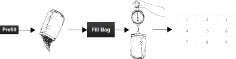
Figure 2.
Set the feed units and select a feed roller that suits the actual microgranulate type.
Enter the values in the calibration menu.
Fill the output system using the button, (E).
Empty the calibration bag and put it back in place.
Select the calibration button (G) and keep the button pressed until the right amount of microgranulate has been fed into the calibration bag. The pulses from the output are displayed alongside the pulse symbol.
Weigh the contents of the calibration bag. Tip: First reset the scales with an empty calibration bag.
Enter the weight of the calibration bag contents in field (D) in the calibration menu. The number of pulses per kg will automatically be displayed in field (F). To enter the number of pulses manually, press field (F) and specify the number of pulses in the pop-up window. To cancel the calibration and perform a fresh calibration, repeat points 3 to 7.
CAUTIONThe calibration result becomes the baseline value. Always check the actual feed rate on the field. If necessary correct the pulses/kg. Example: If the feed rate is actually 10% too little, increase the pulses/kg by 10%. Note the fertiliser pulses/kg and the actual feed rate for future use.
Exit the calibration menu using
 , or go directly to calibration of another
unit
, or go directly to calibration of another
unit
Before drilling, make sure that the same type of feed roller is fitted to all feed units.
Do a new feed check in the field after drilling about a hectare.
Check regularly that deposits have not built up on the seed rollers and in the feed units.