10 Alarms
When an alarm is triggered, an audible signal will be emitted and the alarm will be displayed visually on the home screen. Enter the alarms menu by pressing the alarm symbol. The nature of the alarm is directly described on the screen. If an alarm relates to one or more specific row units, all the row units are displayed as a line of numbered blocks where the row unit(s) indicating alarms are shown in a different colour.
Correct the fault(s) that caused the alarm(s) and dismiss one alarm at a time or all the alarms at once.
An overridden or acknowledged alarm, if it is still active, will be displayed at the bottom of the alarm list as overridden or acknowledged; see Figure 1.
The machine is normally not usable if at least one critical alarm is active. To be able to operate the machine, it is necessary to remedy the fault that the alarm refers to or override the alarm. An overridden alarm is an active critical alarm in cases where the user has chosen to continue using the machine even though certain functionality may be affected.
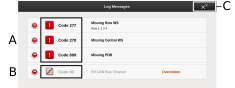
Figure 1.
Examples of alarm codes
Examples of overridden alarms
Acknowledge all alarms.
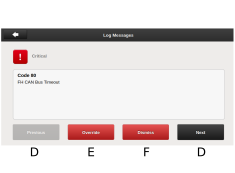
Figure 2.
Move UP and DOWN in the list of alarms.
Override selected alarm.
Dismiss selected alarm.
After a critical alarm has been acknowledged, the system will automatically restart.
Individual alarms can be acknowledged or overridden without needing to open the alarm information. Proceed as follows:
Click the red symbol (G).
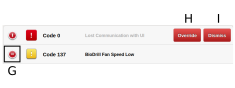
Figure 3.
Press H to override the alarm or I to acknowledge the alarm.
In section all alarms are described with the suggested action required.