11.1.1 Row units
When you raise and lower the machine, all row units always start automatically.
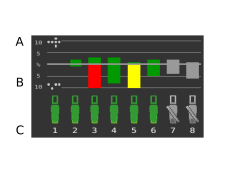
Figure 1.
Bars
The number of doubles – The bar indicates the row unit’s number of doubles as a percentage.
The number of skips – The bar indicates the row unit’s number of skips as a percentage.
Row number
If you use quantity output (seed disc in the seed meter with more than 70 holes), the deviation from the sown amount is shown as a percentage in fields A and B.
A bar chart is displayed for each row unit, which monitors the output. Status indication and a row unit number are also displayed. For more information on row unit statuses, see Colour of row unit symbols.
It is possible to switch on/off the feed from an individual row unit directly on the screen by pressing on the row unit to be changed. Restart the feed by pressing the same row unit again.
Colour of the bars
Drilling quality here refers to the number of skips and the number of doubles.
Green bar = drilling quality within approved area,
Yellow bar = drilling quality is >= 50% of set alarm level
Red bar = drilling quality is >= 100% of set alarm level.
The levels for the different alarms are set in the alarms menu in general settings.