5.4 Row units
Field D on the home screen. See figure Figure 1
A bar chart is displayed for each row unit, which monitors the output. Status indication and a row unit number are also displayed.
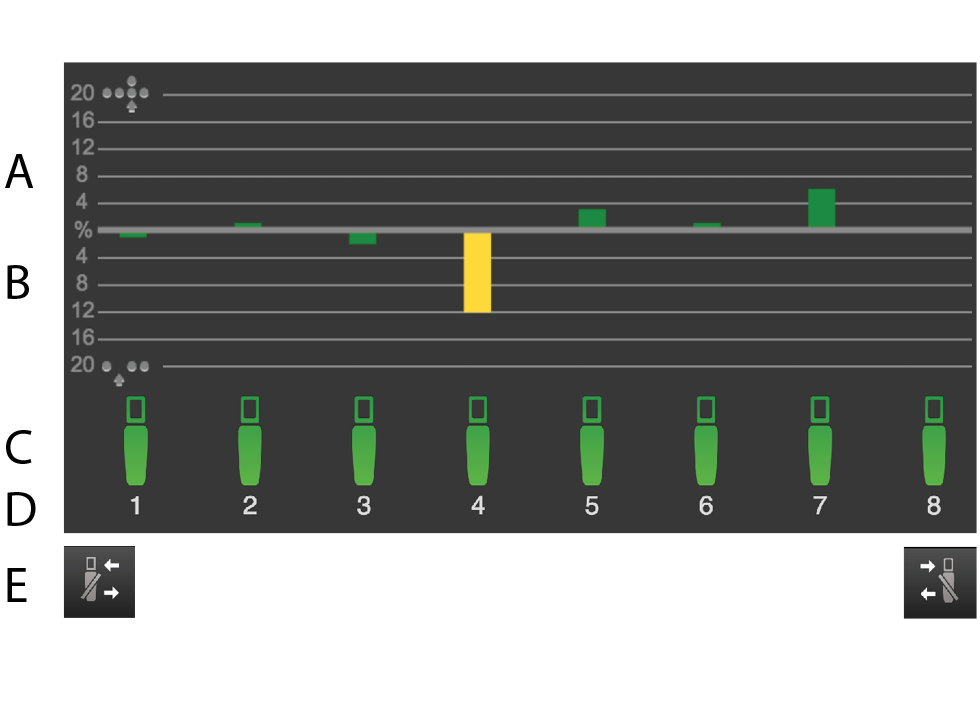
Figure 1.
The number of doubles – The bar indicates the row unit’s number of doubles as a percentage.
The number of skips – The bar indicates the row unit’s number of skips as a percentage.
Row unit status
Row unit number
Activate or de-activate row units from right to left.
It is possible to switch the output on/off for an individual row unit directly on the screen by pressing on the row unit to be changed. Restart the output by pressing the same row unit again. It is also possible to stop and start the output from either the right or the left by using the (E) buttons.
When you raise and lower the machine during operation at a speed in excess of 2km/h, all row units always start automatically.
Colour of the bars
Drilling quality refers here to the amount of skips or doubles, or to the value of the deviation from the specified feed rate when the machine is equipped with a seed disc with more than 70 holes.
Green bar = drilling quality within approved bounds.
Yellow bar = drilling quality is not within approved bounds. 50% of the set alarm level has been reached.
Red bar = drilling quality is not within approved bounds. 100% of the set alarm level has been reached.
The levels for the different alarms are set in the alarms menu in general settings.
Colour of row unit symbols
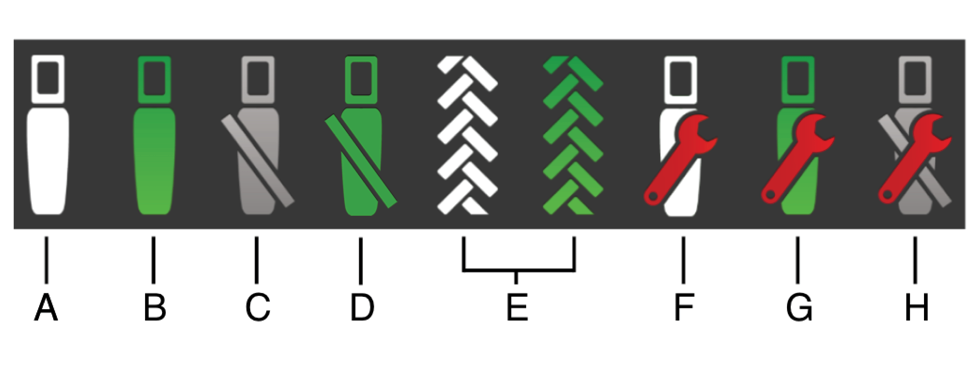
Figure 2.
The row is OK and is not feeding out. The row is not in drilling position.
The row is OK and is feeding out. The row is in drilling position.
The row is switched off.
The row is about to be shut down.
The row is switched off because of tramlining. A green colour is displayed when the machine is in drilling position.
If a red spanner is displayed, this indicates that there is an alarm on the row. There is a fault which needs to be inspected and remedied. There is no feed from the row.
If a red spanner is displayed, this indicates that there is an alarm on the row. There is a fault which needs to be inspected and remedied. The row is attempting to feed out.
If a red spanner is displayed, this indicates that there is an alarm on the row. There is a fault which needs to be inspected and remedied. The row is switched off.