5.2 Display for control and monitoring
If the front hopper is used, verify that the correct fan is used (refer to 6.4 Machine settings) so that a correct value is displayed for C in Figure 1, fan rpm fertiliser.
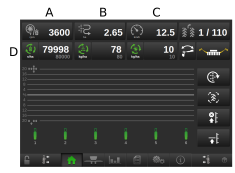
Figure 1.
To display the menu press A, B, or C, see Figure 1.
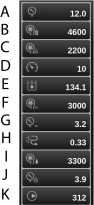
Figure 2.
Information displayed in the dropdown menu:
Air pressure
Fan rotation speed, seed
Fan rotation speed, fertiliser
Operation speed
System pressure, only selectable on TPL with system pressure sensor
Fan rotation speed, seed CF
Air pressure, CF
Area meter Shows area driven since latest reset
Fan rpm, BioDrill
System pressure, liquid fertiliser
Pump speed, liquid fertiliser
During operation, it is a good idea to check at regular intervals that the air pressure in the seed feed housing is maintained at 3.5 kPa.

Figure 3.
Tap on any of the icons on row D; see Figure 1, to switch each individual product on and off (seed, fertiliser, micro-granulate, BioDrill).
Seed activated
Seed switched off
Seed switched off
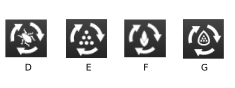
Figure 4.
Micro-granulate (switched off)
Fertiliser (switched off)
BioDrill (switched off)
Liquid fertiliser (switched off)
If you press on the value next to any of the icons on row D, this opens a menu to reset the sown amount for each respective product.

Figure 5.