12.6.1 Adjusting the sensors
Adjusting the detectors on distributor heads is common for all heads, images of the leftmost distributor head are displayed.
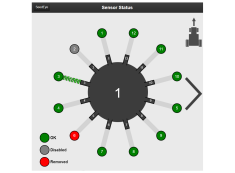
Figure 1.
Defective sensor
Sensors that can not be detected in the sensor chain are marked as Removed automatically. Sensors that are incorrectly addressed will also show up as Removed. For example, if two sensors are addressed to the same position in the chain, both will be marked as removed. This can be solved by readdressing the sensors by pressing the readdress button, see Figure 1.
Double row distance:
Double row distance needs to be configured in the general settings in order to avoid getting incorrect flow alarms. For double row distance settings, see 6.2 General settings.
SeedEye is automatically reregistered when the sensors are updated