6.2 General settings
For daily use no settings need to be entered in the menu.
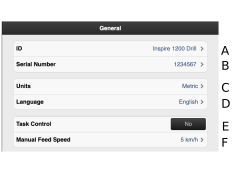
Figure 1.
It is possible to enter user-specific information, e.g. your name.
Record the machine’s serial number here.
Unit of measurement, select metric or imperial
Language setting. Language settings are normally changed in the menu for the control device1. If the desired language for the control unit is not available, the language can be selected in this menu2.
Task Control ON/OFF. While Task Control is enabled/disabled, a countdown will be displayed in place of ON/OFF.
Manual Feed rate.
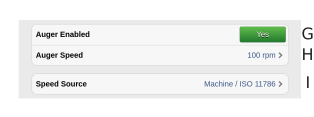
Figure 2.
Auger Enabled ON/OFF.
Auger Speed
Speed source.
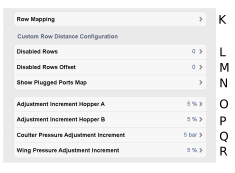
Figure 3.
Row Mapping
Disables Rows
Disabled Rows Offset
Show Plugged Ports Map
Adjustment Increment Hopper A
Adjustment Increment Hopper B
Coulter Pressure Adjustment Increment
Wing Pressure Adjustment Increment
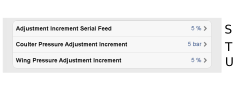
Figure 4. Serial Feed
Adjustment Increment Serial Feed
Coulter Pressure Adjustment Increment
Wing Pressure Adjustment Increment