3.1 Mounting the iPad holder in the tractor
Be sure to check for any concealed wiring prior to any drilling in the tractor cab.
Ensure that the connection cable to the machine is not pinched under the rear window of the tractor, as the cable can easily become damaged. Use the designated hatch or cable hole. Firmly fasten the cable in the tractor cab. This way, the iPad is protected from damage should you forget to unscrew the connection cable from the machine when disconnecting it.
Make sure the volume buttons are not pressed in by the edges of the holder when the iPad is mounted in it.
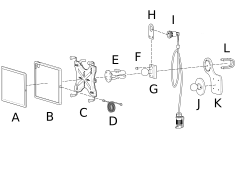
Figure 1.
iPad
Protective case for iPad
Holder
USB-C cable
Bracket
Screw/washer
Bracket
Bracket
Power connector
Bracket (magnetic)
Bracket (magnetic)
Bracket
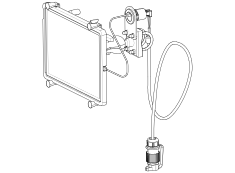
Figure 2.
Mount the holder securely in the tractor cab. The holder should be located within the field of vision when driving forwards. Choose between a standard bracket (G) and a magnetic bracket (J+K). Attach the holder to the bracket as shown in Figure 1.
Connect the USB-C cable (D) to the power connector (I) as shown in Figure 2. Now connect the power connector (I) to the tractor’s 12 V outlet.