6.2 General settings
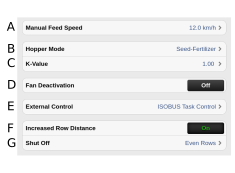
Figure 1.
Speed for manual feed (km/h) Customise the speed for manual feed to the intended driving speed. If the expected driving speed is e.g. 7 km/h, a speed of 7 km/h must be selected for manual feed.
Seed hopper modes (RDAC only)
Seed – Fertiliser
Seed – Seed
Specify whether the machine will be used for combination drilling (a) or whether the whole seed hopper will be used for seed (b).
When seed/seed is selected, fertiliser will be hidden in the UI
K-value. Correction of an average deviation between the selected output quantity of fertiliser and the actual feed rate.
Example: If the required output is 200 kg/ha, but the actual output volume to 160 kg/ha, the K-value can be set to 1.25 to compensate for the deviation. Default setting 1.0.
Fan shut-off ON/OFF. (Applies to RDAC only).
External Control is a GPS-based help function for use in the field. See 6.4 External Control.
Increased row spacing ON/OFF. Can switch off even or odd rows. Only visible for fully equipped CANBus Flexhead. When “Increased row spacing” is activated, tramlining will be switched off, and half machine shut-off will be disabled (regards RDAS400 only). The sown amount will not be reduced.
Shut-off. Even or odd rows.
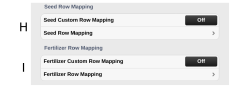
Figure 2.
Row output, seed
Row output, fertiliser
If a custom setting for detectors for seed/fertiliser row output (J/K) is set, it can be factory reset by turning it off (off).
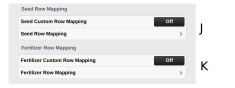
Figure 3. General menu settings
Seed/Fertiliser row output (J/K), see 6.2.1 Adapting the sensors to the seed feed.