7.5 Interactive Depth Control, IDC
Interactive Depth Control (IDC) makes it possible to fine-tune the drilling depth from the tractor cab while driving. In the IDC menu you should also set the levels for “Low-lift/Drilling depth” and “feed start/output stop”.
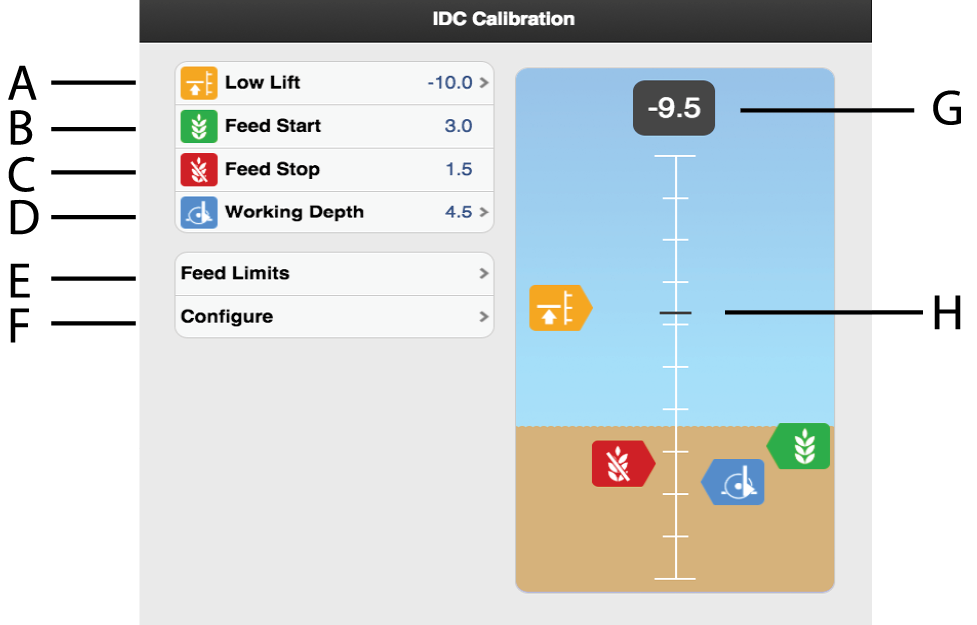
Figure 1. Calibration of IDC
The system must be calibrated before the different levels can be set, see 7.5.1 Calibration of IDC – the function.
Level for LowLift
Height above ground level is shown as a negative number. The default setting is -10, which corresponds to a Low-Lift height of approx. 10 cm.
Level for seed feed start
The level at which the seed meter shall begin dispensing seed when the machine is lowered to drilling position. The value is in relation to the drilling depth.
Level for seed feed shut-off
The level at which the seed meter shall stop dispensing seed when the machine is raised from drilling position. The value is in relation to the drilling depth.
Drilling depth
The sowing depth is shown as a positive value and must be greater than the Low-Lift level.
A setting of 4.5 corresponds to a sowing depth of 4.5 cm.
Output settings
Setting the feed output start and feed output stop. See7.5.2 Setting the feed output..
Calibration menu
Calibrate. See 7.5.1 Calibration of IDC – the function.
Current scale value
Current scale value for the lifting ram.
Current height
The line indicates current position on the scale.
If you already know which value is to be set for the Low-Lift level or sowing depth, you can do this by pressing on the field that shows the value for the function you want to change. Enter the value in the pop-up window and confirm.
Feed output start and stop are set via (E).
The icons for feed output start  or feed output shut-off
  may never be higher than the icon for
the LowLift level
may never be higher than the icon for
the LowLift level  or lower than the icon for the drilling
depth
or lower than the icon for the drilling
depth  . The two values may not overlap each
other, either.
. The two values may not overlap each
other, either.