7.1.1 Add product
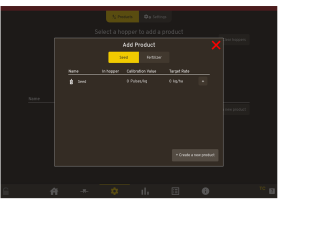
Figure 1.
Click on the (+) sign to select the desired Seed or Fertilizer.
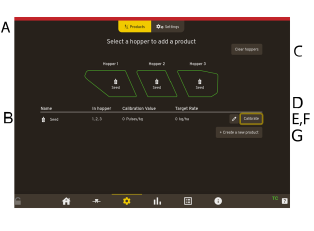
Figure 2.
Products — Seed/Fert/Add new product
Hopper 1/Hopper 2/Hopper 3 — Connects/disconnects the product from the hopper. Press the hopper that should be changed.
Clear hoppers— Opens the page to disconnect a product.
Target Rate (kg/ha).
Edit — Click on the pencil to access the Edit Product
Calibrate — Calibration per product
Create a new product.
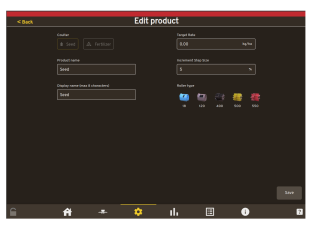
Figure 3.
Enter the values to edit an existing product.
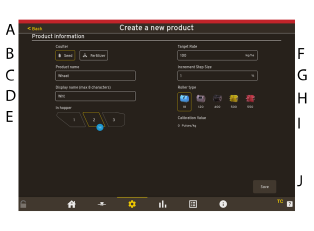
Figure 4.
Enter the values for a new product.
Back — Go back to previous menu.
Choose coulter — Seed/Fertilizer.
Product name — Enter a name of the product.
Display name — Enter the name that should be displayed.
In hopper — Displays which hopper that selected for the product.
Target Rate (kg/ha) — Enter a value for the selected hopper.
Increment Step Size (%) — Enter a value.
Roller type — Choose which roller that is in use that are in use for this product.
Calibration value — Pulses / kg.
Save.