19.4 Alarm WSX
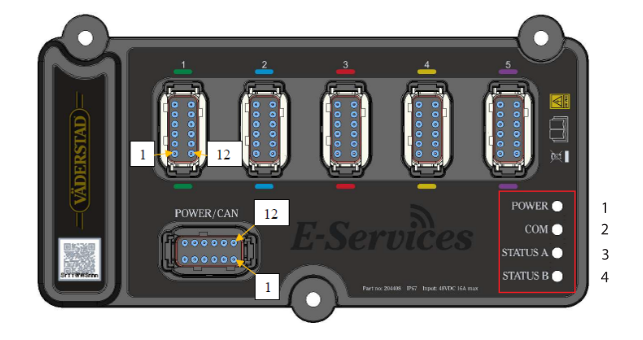
Figure 1.
The following table describes how WSX uses LED1 (Power) to indicate the current system state. LED1 is also used to indicate the status of the threads in the application layer.
When all threads run as expected, LED1 blinks slowly at a constant speed. If one or several of the application threads don’t function correct, LED1 stops blinking.
|
LED 1 (Power) colour |
Description |
|---|---|
|
Blue |
Bootloader is running (CAN bootloader or startup sequence) |
|
Cyan |
Application has started (bootloader is no longer running) |
|
Yellow |
The application is in system halt state. For example, when there is no communication with Gateway. |
|
Green |
The application is in normal power mode |
|
White |
The application is in low power mode |
|
Magenta |
The application has reached an error state |
The following table describes how WSX uses LED2 (COM) to indicate the CAN communication status. LED2 is also used to indicate the amount of CAN communication to and from a WSX device. Three separate blinking cycles are used to indicate low, medium or high traffic:
-
Low traffic
-
Cycle time 2080 milliseconds
-
Medium traffic
-
Cycle time 1040 milliseconds
-
High traffic
-
Cycle time 520 milliseconds
|
LED 2 colour |
Description |
|---|---|
|
Green |
CAN communication OK |
|
Blue |
CAN communication OK. Firmware upgrade is running. |
|
Magenta |
CAN communication error. |