6.1 General machine settings
Under General machine settings, the user can switch the products and functions that the machine is equipped with on or off. The user can also set sensor sources, machine data, various adjustment steps, language and unit to optimise the user interface.
Each machine is preconfigured at the factory with the correct type and size etc.
Replacing the Gateway unit that contains the machine’s memory, requires resetting the machine’s default settings.
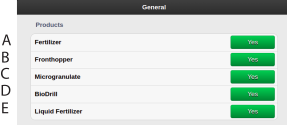
Figure 1.
Fertiliser YES/NO
FrontHopper fertiliser YES/NO
Microgranulate YES/NO
BioDrill YES/NO
Liquid fertiliser YES/NO
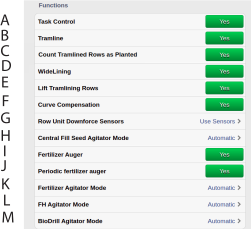
Figure 2.
Task Control YES/NO. While Task Control is enabled/disabled, a countdown will be displayed in place of ON/OFF.
Tramline YES/ NO
Count tramlined rows as planted. If selected, section with active tramlining is counted as seeded area and shows as coverage on the task controller map.
WideLining YES/NO
Lift Tramlining Rows YES/NO
Curve Compensation YES/NO
Row unit Downforce Sensors
Central Fill Seed Agitator mode Automatic/ON/OFF
Fertiliser Auger YES/NO
Periodic Fertiliser Agitator YES/NO
Fertiliser Auger Mode Automatic/ON/OFF
FH Agitator mode Automatic/ON/OFF
Agitator BioDrill Mode
ON: Electric motor/ hydraulic valve is always running/open
OFF: Electric motor/ hydraulic valve is never running/open
AUTOMATIC: Electric motor/hydraulic valve running/open when any of the BioDrill motors are running.
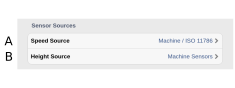
Figure 3.
Sensor source
Speed source
Height source
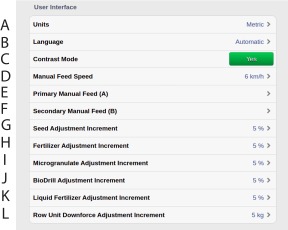
Figure 4.
User interface
Units. Metric or imperial.
Choice of language. Language settings are normally selected in the menu for the control unit.6. If the desired language for the control unit is not displayed, the language can be selected in this menu 7
Contrast mode YES/NO
Manual Feed Speed
Primary Manual Feed (A). Select which products that should feed when using the primary manual feed button on the dashboard. All activated products for this machine are presented as choices for this setting. All products are selected by default
Secondary Manual Feed (B). Select which products that should feed when using the secondary manual feed button on the dashboard. All activated products for this machine are presented as choices for this setting. No product is selected by default. This button is only visible if at least one product is selected for this setting.
Seed output percentage, is adjusted by pressing the +/- buttons on the home screen.
Fertiliser output percentage is adjusted by pressing the +/- buttons on the home screen.
Microgranulate output percentage is adjusted by pressing the +/- buttons on the home screen.
BioDrill output percentage is adjusted by pressing the +/- buttons on the home screen.
Liquid fertiliser output percentage is adjusted by pressing the +/- buttons on the home screen.
Row Unit Downforce is adjusted by pressing the +/- buttons on the home screen.
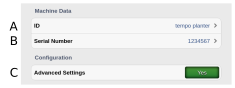
Figure 5.
Machine data, configuration
Free text field for naming the machine
The machine’s serial number.
Advanced settings YES/NO