6.2 Alarm levels
Alarm settings
Set the level to the alarms that are to be activated. To reset an alarm, press on the field required and set a new alarm level in the pop-up window.
The Alarm delay indicates the time-lapse between an error signal from the sensor, and the visual/audible alarm on the home screen. The alarm indication should be slightly delayed to avoid alarms at low driving speeds.
All alarms on the machine have a level to define when the alarm will be active. Some alarms also have a delay to define how long the value will be at this level before the alarm is displayed as active. To be specific, the time delay defines the time from when a sensor detects the error to when it is visually displayed on the screen. The delay is necessary to avoid alarms at low driving speed. However, the delay must be as short as possible so that even sudden brief interruptions can be detected.
To change the delay or level for an alarm, press the field and enter anew valid delay or level in the field.
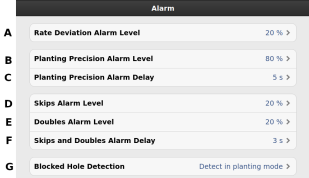
Figure 1.
Rate deviation level. Alarm level for deviating sow amount (seed/ha) at quantity output.
Planting precision alarm level. Generates an alarm if the planting accuracy for one of the row units deviates from the expected accuracy by more than the set alarm level.
Alarm delay (secs) for planting precision. Basic setting: 5 seconds.
Alarm level for the number of skips within each row. Default setting: 20%
Alarm level for the number of doubles within each row. Default setting: 20%
Alarm delay (secs) for the number of skips and doubles.
Detection of a blocked hole. Select whether blocked holes should be detected in planting mode, in planting mode and seeding mode, or not detected at all
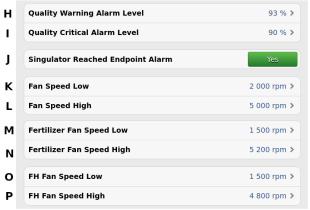
Figure 2.
“Warning” alarm level for drilling quality. Drilling quality is the deviation percentage for skips and doubles together. Displayed as a bar chart on the statistics page (yellow marking if the accuracy is less than the set alarm level)
“Critical” alarm level for drilling quality. Drilling quality is the deviation percentage for skips and doubles together. Displayed as a bar chart on the statistics page (red marking if the accuracy is less than the set alarm level).
Singulator has reached end position. Select YES if the user wants an alarm to signal when the singulator reaches the end position
Fan rotation speed alarm level, lower alarm level. Default setting: 2,000 rpm.
Fan rotation speed alarm level, upper alarm level. Default setting: 5,000 rpm.
Alarm level for fan speed, fertiliser, lower alarm level. Basic setting: 1500 rpm.
Alarm level for fan rotation, fertiliser, upper alarm level. Basic setting 5200 rpm.
Fan speed alarm level, FrontHopper 2200, lower alarm level. Basic setting: 1500 rpm.
Fan speed alarm level, FrontHopper 2200, upper alarm level. Basic setting: 4800 rpm.
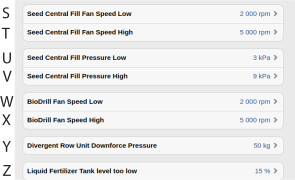
Figure 3.
Fan speed alarm level, Central Fill, lower alarm level. Basic setting: 2000 rpm.
Fan speed alarm level, Central Fill, upper alarm level. Basic setting: 5000 rpm.
System pressure alarm level, Central Fill, lower alarm level. Basic setting: 3kPa.
System pressure alarm level, Central Fill, upper alarm level. Basic setting: 9 kPa.
Fan speed alarm level, BioDrill, upper alarm level. Basic setting: 5000 rpm.
Fan speed alarm level, BioDrill, upper alarm level. Basic setting: 5000 rpm.
Deviating row unit pressure. Emits an alarm when the row unit pressure deviates by the indicated number of kg.
Alarm level for low tank level, liquid fertiliser. Default setting: 15% .