12.10.2 Virtual Terminal (ISOBUS)
The feed rate is adjusted through a pop-up window directly on the home screen where it is possible to select a percentage change (the example in the screenshot shows the setting for the amount of seed delivered). The percentage change is recorded in the calibration menu; see 11.2.2 General settings.
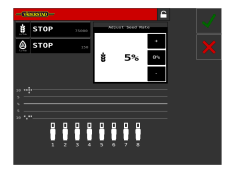
Figure 1.
Open the pop-up window by pressing the field for the seed application rate.
Close the window by pressing the same field that opened the window.
 increases the feed rate in accordance
with the selection in calibration.
increases the feed rate in accordance
with the selection in calibration.
 reduces the feed rate, in accordance with
the selection in the calibration.
reduces the feed rate, in accordance with
the selection in the calibration.
 resets to zero.
Press the green check mark to apply the change.
The red cross cancels the setting of variable rate.