10 Alarms
When an alarm is triggered, an audible signal will be emitted and the alarm will be displayed visually on the home screen. Enter the alarms menu by pressing the alarm symbol. The nature of the alarm is directly described on the screen. If an alarm relates to one or more specific row units, all the row units are displayed as a line of numbered blocks where the row unit(s) indicating alarms are shown in a different colour.
Remedy the fault(s) that caused the alarm(s) and acknowledge one alarm at a time or all the alarms at once.
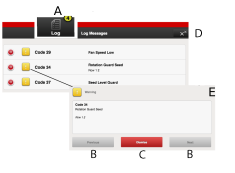
Figure 1.
Alarm symbols displayed on the home screen.
Move UP and DOWN in the list of alarms.
Acknowledge individual alarms.
Acknowledge all alarms.
Example of a view showing that the alarm relates to the seed rotation monitor.
If there are critical alarms, they must all be acknowledged before restarting WS9.
An individual alarm can be acknowledged without opening the alarm information. Proceed as follows:
Click the red symbol (G).
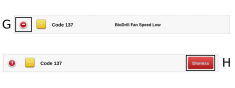
Figure 2.
Press H.
In section 19 Alarm list, ISOBUS/E-Control all alarms are described with the suggested action required.