8 Operational settings
Operational settings are available in the following instances:
Always for TPF.
On machines with hydraulic row unit pressure.
When the FH 2200 front hopper is used.
On machines with liquid fertiliser.
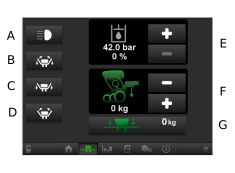
Figure 1.
Front hopper work lights
Switches the work lights on the front hopper ON/OFF. 1
Wing folding2
Leave transport position 3
Return to transport position 4
Hydraulic system pressure. For full functionality, the pressure should be over 140 bar. The screen displays the value for the current pressure in the system. System pressure is adjusted using +/- buttons. The size of the adjustment is displayed by the percentage value. The value should only be adjusted if the pressure is not high enough after the correct seed fan rpm has been set.5
Current row unit pressure. Row unit pressure is adjusted using the +/- buttons. 6
Current wing pressure7
The symbols for row unit pressure and wing pressure are green when the function is active; otherwise, they are grey.