6.3.4 Changing a suggested tramline
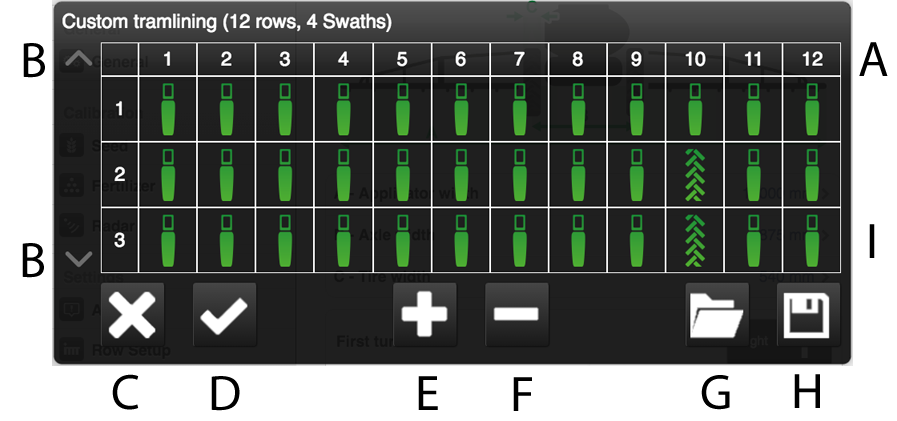
Figure 1.
Changes to the tramline program can be made by shutting off one or more row units in bouts where tramlining tracks are to be laid.
Row units
Arrows used to scroll through the various bouts of the tramline program.
Cancel
Accept
Add a bout to the tramline program.
Remove a bout from the tramline program.
Open a saved tramlining program.
Save the current tramlining program.
Displays whether the row unit will be sowing or turned off for each bout.
To change a suggestion / create a tramline:
Select which row unit(s) is/are to be shut off during tramlining by pressing on the row unit(s). When marking the row unit, it switches between tramlining (wheel tracks) or normal sowing.
Press (E) for additional bouts and (F) to reduce the number of bouts.
Confirm the change by pressing (D) To undo changes, press (C).
For successful tramlining, it is very important to think through where they are going to be before starting work.