12.2 SeedEye box
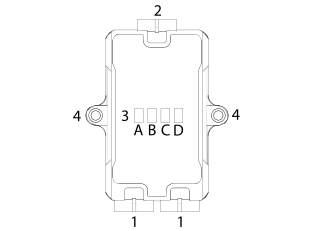
Figure 1.
Built-in CAN BUS Connector (prev./next CAN device)
TE Superseal 4–pin Male
Built-in X-LiNE BUS Connector (sensor connection)
TE Superseal 4–pin Male
RGB Control LEDs
Power IN / CAN BUS / X-LiNE BUS / Power OUT
Fixing position
M7 Screw
|
Power IN |
CAN BUS |
X-LiNE BUS |
Power OUT |
|
|---|---|---|---|---|
|
LED # |
A |
B |
C |
D |
|
GREEN |
Input Voltage OK |
Conneted |
Connected Sensors |
Output Voltage OK |
|
ORANGE |
Not Used |
Waiting for connection |
Solid : no sensors detected Blink: sensor detection problem1 |
Not Used |
|
ORANGE/BLUE |
Not Used |
Not Used |
Sensors in boot mode detected2 |
Not Used |
|
RED |
Low Input Voltage |
CAN BUS Error |
X-LiNE BUS Error |
Low Output Voltage |
|
BLUE |
Firmware Update |
|||
1 The orange blink code
could indicate one of the following cases:a. Sensor
address collision (sensors with identical saved address are connected).b. The addresses of the detected sensors are not continuous.c. Sensors without valid address detected.
2 Some of the connected sensors
are in bootloader mode (these sensor’s LED light blue in this case).
Perform a sensor firmware update to eliminate this.