10.1 Virtual level meter
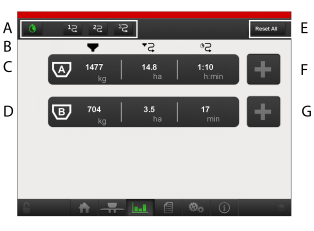
Figure 1.
-
A
-

-
Virtual level meter
-

-
Trip meter 1
-

-
Trip meter 2
-

-
Total
-
B
-

-
Remaining filled product. When pressing in respective field for hopper A or hopper B the product can be reset, see Figure 2.
-

-
Remaining area
-

-
Remaining time
-
C
-

-
Hopper A, remaining products
-
D
-

-
Hopper B, remaining products
-
E
-
Reset all products (both hopper A and hopper B), see Figure 2.
-
F
-
Change the total weight of products in hopper A, see 10.1.1 Add product.
-
G
-
Change the total weight of products in hopper B, see 10.1.1 Add product.
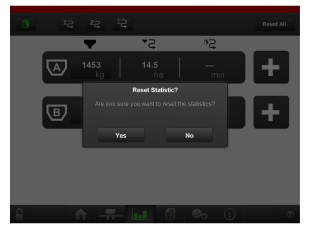
Figure 2.