7.2 Hopper A and B
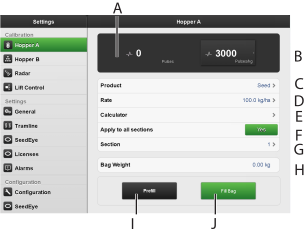
Figure 1. Hopper A
Calculates the number of pulses.
Calculates pulses/kg.
Enter the product (the product is either seed or fertiliser).
Depending on which hopper that is being calibrated, the choices are also:
Follow Hopper A
Follow Hopper B
If the product for Hopper B is set to “Follow Hopper A”, the serial output is activated. The machine will start the output from Hopper A. When Hopper A is empty according to the level guards, the machine will start the output from Hopper B instead.
Seed application rate.
Opens the calculator, see 7.2.2 Calculator.
Set the same value for all sections ON/OFF.
Set value only for selected section.
Enter the weight of the contents of the calibration bag.
Feed for filling the feed system.
Calibrate