10.9 Seed coulter pressure
 Tap the field in the work display to
open a pop-up window in which you can set the pressure and depth setting
on the seed coulters.
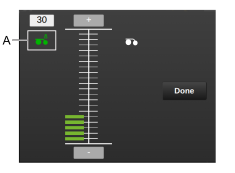
Figure 1. Popup-window for seed coulter settings
To change the seed coulter pressure, tap the seed coulter pressure icon (to the left) so that it becomes highlighted in green.
Increase the pressure by pressing  .
Reduce the pressure by pressing  .
When the seed coulter pressure is adjusted, the updated value is automatically displayed in the status bar on the home screen.