10.8 Hydraulic following harrow
 Tap the field in the work display to
open a pop-up window in which you can set the pressure for the following
harrow for the sowing position and for the LowLift position individually.
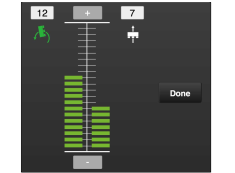
Figure 1. Popup-window for following harrow settings
To change the following harrow’s pressure in the sowing position
press
To change the following harrow’s pressure in the Low-Lift position
(on headland), press 
Increase the pressure by pressing  .
Reduce the pressure by pressing  .
To change the following harrow to the raised position while working, change to 0.
Note
The following harrow always uses its own weight. Step 1 is maximum load − step 20 its own weight.