12.1.1 Alarm menu
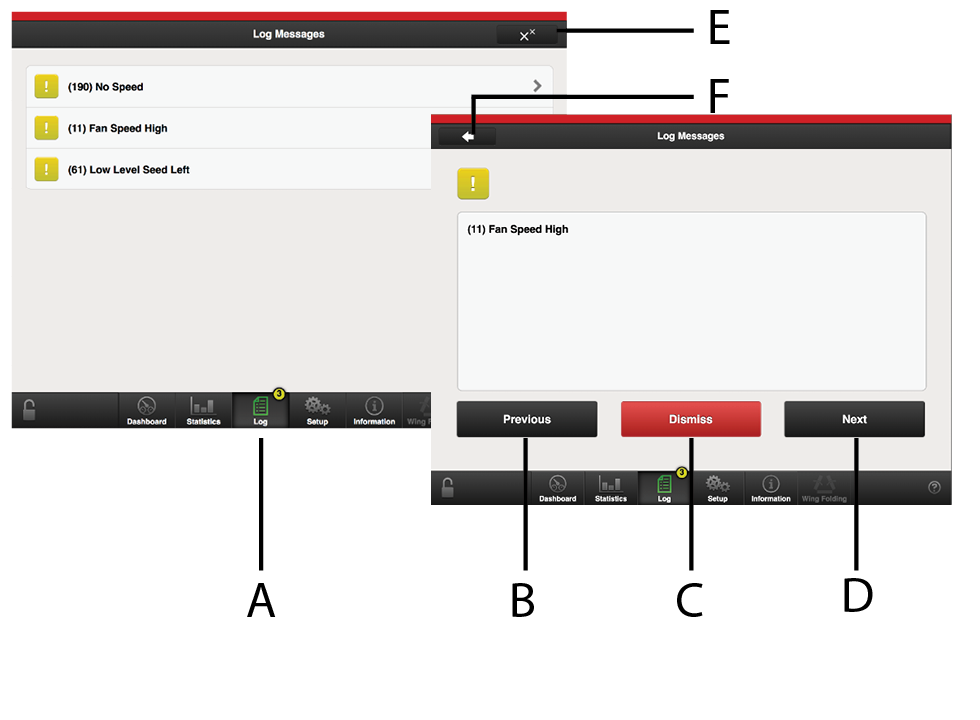
Figure 1.
Alarm symbols displayed on the home screen
Move UP the list of alarms.
Acknowledge individual alarms.
Move DOWN the list of alarms.
Acknowledge all alarms.
Go to previous view
The alarms menu shows a list of all alarms that have not been acknowledged.
If an alarm concerns different sections, e.g. right or left seed meter, this is specified with RIGHT/LEFT or BOTH in the alarm text.
Enter the alarms menu by pressing the popup window or the alarm symbol.
Select an alarm by using the UP/DOWN arrows on the VT or press an alarm field on the iPad. Information about the alarm is shown in the new window .
Rectify the fault(s) that has/have caused the alarm.
Acknowledge one alarm at a time or all of the alarms at once.
If there are critical alarms, they must all be acknowledged before work can continue. If there is a critical alarm, the feed is shut off!
In section 12.2 Alarm list all alarms are described with the suggested action required.