10.3 Setting tramlines
The work display shows the tramlining
cycle.
The first number shows which phase of the tramlining cycle you are in.
The second digit shows the number of tramlining cycles in the tramlining program, see 6.5 Tramlining for setting the tramlining cycle.
Green symbol = tramlining enabled.
White symbol = tramlining is disabled.
Red symbol = indicates a problem with tramlining.
Step in the tramlining program by tapping
the field 
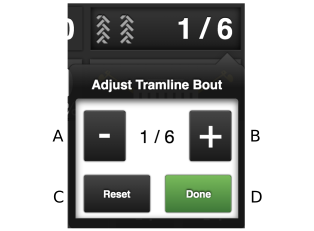
Figure 1.
Steps back in the tramlining program
Steps forward in the tramlining program
Restarts the tramlining program on 1
Confirms any change in the sequence
To step in the program, tap + or - until the desired drawbar is displayed in the program and then press Done. To close the dialog box without making any changes, tap outside the box.