7.1.3 Setting of seed type (SeedEye)
CAUTION
It is very important that the correct seed type is selected.
If the wrong seed type is selected or if the seed meter is not set to the specified scale value, the SeedEye system will not provide the correct result.
Select seed type from the list (B).
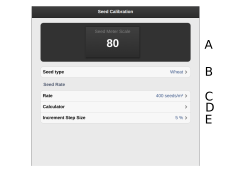
Figure 1.
Scale value (A) is automatically specified based on the selected seed type.
Manually adjust the seed meter on the machine to the specified scale value (A).
Specify the required seed rate, in seeds/m2.
Set the required percentage increase/decrease of seed output in the adjustable seed amount (E). If you select, for example, 5%, the application rate will change in increments of 5% every time the button is pressed in the operations menu.