E-services < Back to Instructions Search Portal

E-services

2.7 E-keeper

    904255 - 05 - en-GB

    2.7 E-keeper

    The E-keeper dock provides a firm grip for the user and there are a number of easy-to-access buttons for controlling the most frequently used functions whilst operating.
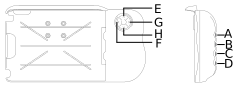
    Figure 1.

    Contents
    1. 2.7.1 Button functions
    Parent topic: 2 Product description
    Previous topic: 2.6 Software

    © Copyright Väderstad Group

    Find topics by title

    Topic finder activated by typing “t”. Continue typing to filter the list of topics.

    Use ↑ and ↓ to navigate the results; then press ENTER to view a topic, or ESC to close this dialog.

    Keyboard shortcuts

    You’ve activated the keyboard shortcuts help by typing “?”.

    t Open the topic finder to filter the list of topic titles
    s Use the search field to find text in topic content
    ? Show this list of keyboard shortcuts
    ESC Close this dialog